
typora 设置腾讯云图床配置文件
0. 前言
ubuntu 中 配置typora腾讯云图床,关于配置文件的设置
1. 正文
按照如下图所示,选择PicGo-Core,下载更新,
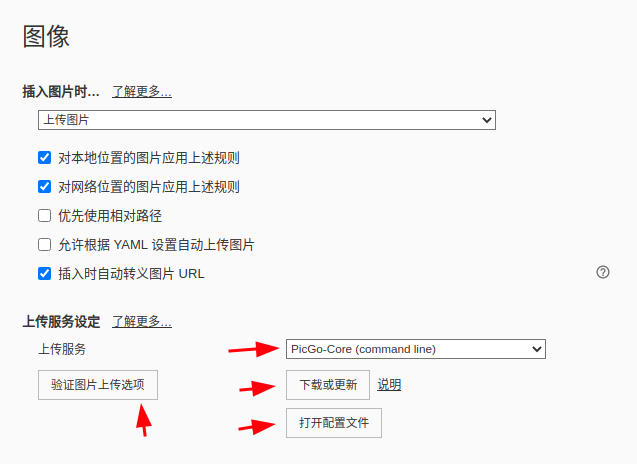
可以点击‘打开配置文件’,也可使用命令vim ~/.picgo/config.json 粘贴如下内容,替换其中的appID,bucket,secretId,secretKey,area,可在腾讯云的对象存储中找到,token可登录https://sm.ms/home/apitoken网站,注册后在链接位置找到
1 | { |
最后‘验证图片上传选项’,查看是否成功。
参考
[1] https://sm.ms/home/apitoken
[2] https://www.cnblogs.com/suguangti/p/14702744.html
[3] https://blog.csdn.net/NicolasLearner/article/details/117825767#t4
本博客所有文章除特别声明外,均采用 CC BY-NC-SA 4.0 许可协议。转载请注明来自 胡侃有料的博客!
 wechat
 alipay
评论